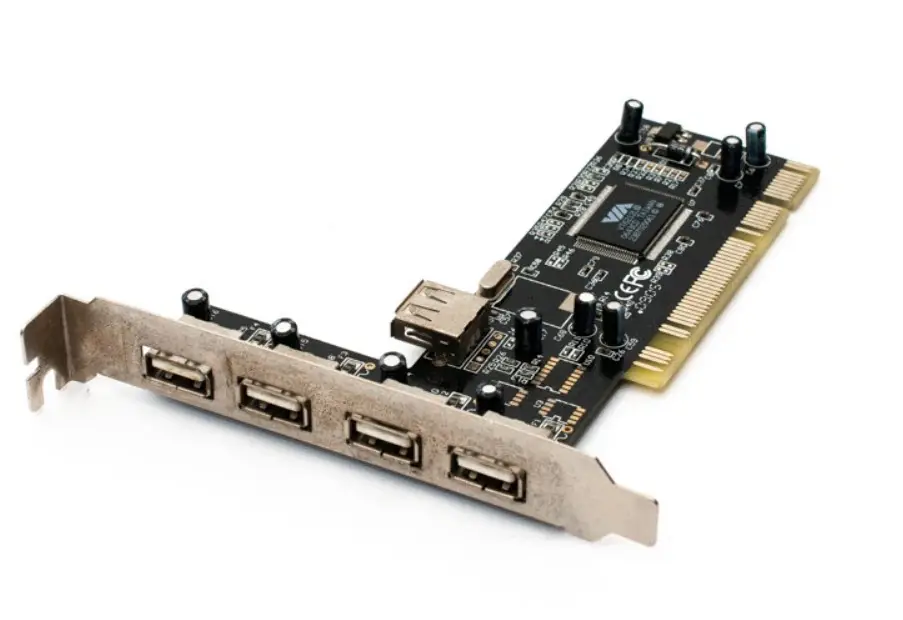
Description
A PCI to USB 2.0 controller with 4+1 ports typically offers 4 external USB 2.0 ports and 1 internal header, allowing expansion of USB connectivity on older desktop systems. It’s ideal for adding high-speed USB support to PCs without native USB 2.0.
🔌 Overview: PCI to USB 2.0 Controller (4+1 Ports)
This type of controller card is designed to be installed in a standard PCI slot on a desktop motherboard. It adds USB 2.0 functionality, which supports data transfer rates up to 480 Mbps, significantly faster than USB 1.1.
🛠️ Typical Specifications
| Feature | Description |
|---|---|
| Interface | PCI 2.2 (32-bit, 33 MHz) |
| USB Ports | 4 external USB 2.0 Type-A + 1 internal USB 2.0 header |
| Controller Chipset | Common variants include VIA VT6212L, NEC D720101, or ASIX MCS9990 |
| USB Standards Supported | USB 2.0 (High-Speed 480 Mbps), USB 1.1 (Full-Speed 12 Mbps, Low-Speed 1.5 Mbps) |
| Host Controller Types | EHCI for USB 2.0, OHCI/UHCI for USB 1.1 |
| Power Supply | Typically powered via PCI slot; some models include Molex connector for extra power |
| Operating Systems | Windows XP, Vista, 7, 8, 10; Linux support varies by chipset |
| Form Factor | Standard PCI card (not PCIe) – check compatibility with your motherboard |
✅ Use Cases
- Upgrade older PCs lacking USB 2.0 ports
- Connect high-speed peripherals like external drives, webcams, printers
- Add internal USB header for front panel ports or internal devices
- Extend USB connectivity for embedded or industrial systems
🔧 Installation Tips
- Power off and unplug your PC
- Insert the card into an available PCI slot
- Secure the card and connect any internal power if required
- Boot the system and install drivers (Windows often auto-detects)
- Verify functionality in Device Manager or system settings
Reviews
There are no reviews yet.